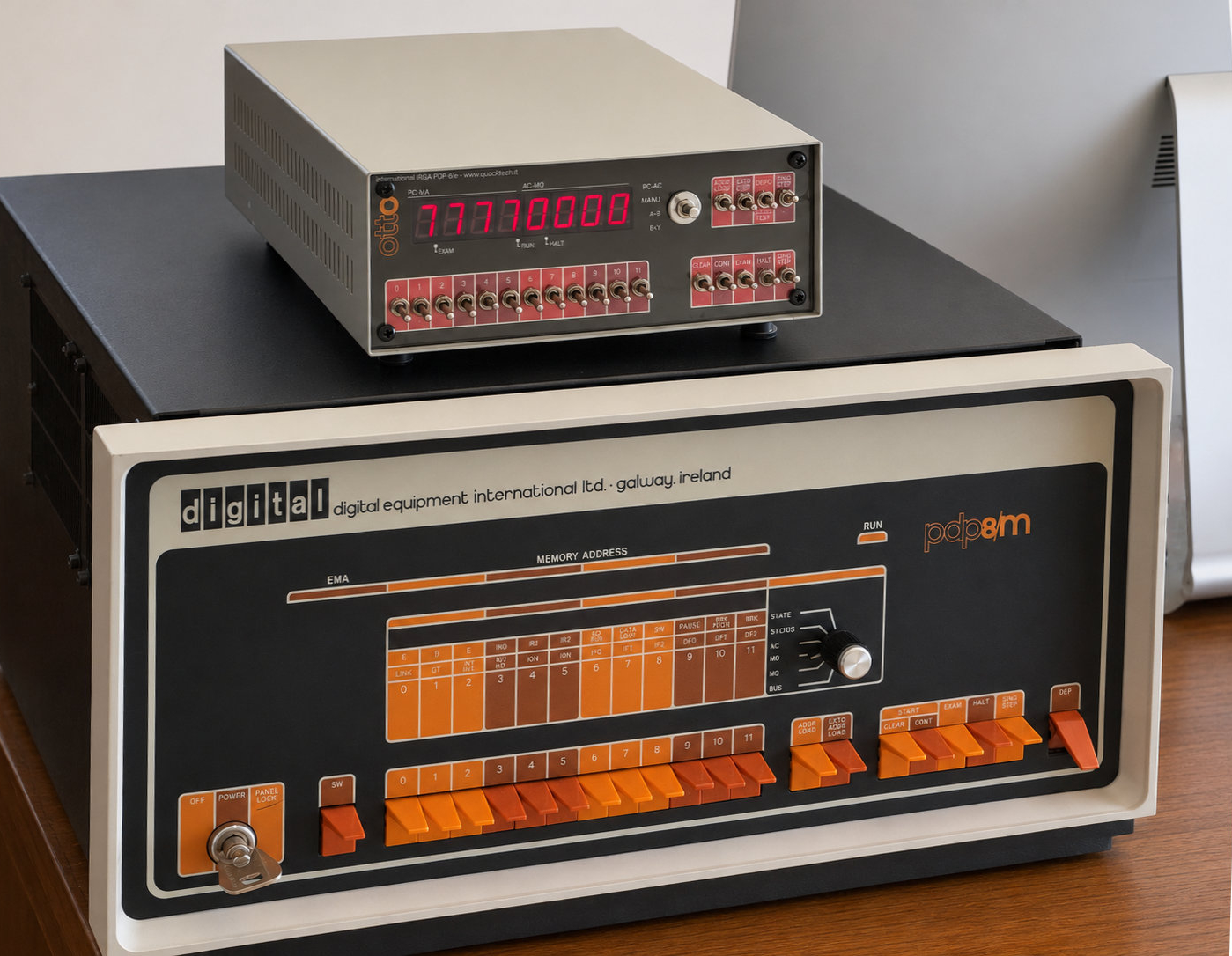
To build a PDP-8 today? Well, perhaps before answering we should explain what a PDP-8 is. From this alone, after all, two things become immediately clear: how old you are and what you have done in life.
Certainly, if you are past a certain age and have worked in computing, electronics, or automation, you will know perfectly well what a PDP-8 is. Apart from the usual quibbles that arise whenever the word “first” is used, the PDP-8 from Digital Equipment Corporation can reasonably be considered the first minicomputer in history: it appeared several years before the microprocessor and was one of the inventions that helped change the course of technology.
Dinosaurs
Before the PDP-8, computers were real dinosaurs: large, expensive, and power-hungry. They were rarely small enough to fit into a living room.
But cost and size were not their only defining features. They were distant machines, almost solemn ones, and practically nobody would have thought of putting one at home. This was often true even for industrial companies, laboratories, and research centers.
They usually lived in the “machine room,” dominated by the hum of fans, where only a chosen few were admitted. Users accessed them indirectly, handing in tapes or punched cards and receiving, after some time, printed listings on the typical continuous-form paper with perforated edges.
Digital Equipment Corporation
It was against this background that Digital Equipment Corporation began, almost silently, a revolution destined to change the world.
Digital Equipment Corporation, universally known as DEC and later simply as Digital, was founded in 1957 by Ken Olsen and Harlan Anderson. Both came from MIT Lincoln Laboratory, where they had worked on some of the most advanced digital machines of the time, including the TX-0 and TX-2 computers and some aspects of the gigantic AN/FSQ-7 system of the SAGE air-defense project.
One of the first strokes of genius, although partly imposed by the investors, was the company name itself. The founders would have preferred to call it Digital Computer Corporation, but they were advised against it. At the time, the word computer still evoked something enormous, expensive, and remote: a machine housed in a computing center, with specialized staff, air conditioning, raised floors, formal procedures, and investments beyond the reach of most organizations.
Computers were not yet perceived as tools to be placed near the people who needed to use them.
The name Digital Equipment Corporation was much more cautious and flexible. It suggested instruments, control systems, laboratory equipment, and digital logic blocks, without directly challenging IBM and the other giants of computing.
DEC’s first products followed the same approach. The company settled in an old woolen mill in Maynard, Massachusetts, a place that would remain closely tied to its history, and did not begin by selling complete computers. Instead, it offered transistorized logic modules: plug-in boards, each capable of performing a small digital function, intended for laboratories, control systems, test benches, and special-purpose equipment.
This point is important, because it places DEC in a world different from that of the large mainframe manufacturers. From the beginning, the company lived close to engineers, laboratories, instruments, experiments, and real machines. It did not sell computing as a centralized and abstract service: it sold digital logic that a technician could understand, connect, combine, and use.
Only later did DEC begin to sell complete computers. Even then, however, it carefully avoided the forbidden word.
Programmed Data Processors
DEC’s first computer, introduced in 1960, was the PDP-1. The acronym PDP is historically associated with the expression Programmed Data Processor, although it is often naturally interpreted as Programmable Data Processor. In either case, the essential point is clear: DEC carefully avoided calling those machines “computers.”
This was not only a technical choice, but also a commercial and psychological one. Calling them computers would have meant immediately comparing them with million-dollar mainframes and with all the cultural and organizational apparatus surrounding them. Calling them data processors instead suggested something different: a programmable electronic instrument, powerful but accessible, suited to scientific work, real-time control, laboratories, and direct interaction with the physical world.
The PDP-1 cost about $120,000 at the time: not a small amount, of course, but far less than the large computers of the era. It was inexpensive enough to make ownership conceivable for a different kind of customer. A university laboratory, a research group, or a technically ambitious company could finally imagine owning such a machine.
New applications
We should not think of the PDP-8 simply as a smaller and less expensive computer. Its real importance was something else: because of its size, price, and flexibility, it could become the brain of machines and equipment that until then could never have contained a computer.
I have described many electronic devices, but few of them can be called machines in the most literal sense of the word. Of course, we also use the word for oscilloscopes, receivers, transmitters, signal generators, counters, and power supplies. Strictly speaking, however, a machine is something that acts upon the physical world: it moves, regulates, transports, prints, cuts, measures, selects, controls, repeats, or transforms.
For much of industrial history, the behavior of these machines was imprisoned in their construction. Gears, cams, shafts, relays, solenoids, contacts, selectors, and later hard-wired electronic logic could achieve extraordinary results. Many of those systems were ingenious, reliable, and sometimes almost magical in the complexity of the functions they could perform without any software at all.
But they remained bound to their physical structure; their behavior was established once and for all by mechanical shapes, electrical connections, relay sequences, logic gates, and the intelligence of their designers. If a different behavior was desired, in most cases the machine itself had to be modified.
This remained true even when control progressed from mechanical to electrical and then electronic systems. It was certainly an enormous technological advance: machines became faster, more compact, quieter, more reliable, and less subject to wear. Relays could replace cams; electronic logic could replace relays; sensors could replace mechanical contacts. From a conceptual point of view, however, the behavior of the machine was still fixed by the hardware.
With programmable systems, however, a logical leap occurred.
In a stored-program computer, the behavior of the machine could be described by instructions. It could be corrected, extended, or transformed by changing the program. Naturally the machine did not “think” in the human sense of the word, but it could follow a sequence of instructions, make elementary decisions, react to external conditions, acquire data, and control devices according to a modifiable logic.
The essential point is this: electronics could make a fixed behavior faster and more reliable; programmability made the behavior itself modifiable.
When microprocessors appeared in the mid-1970s, this idea became almost obvious. Suddenly it was possible to place a programmable processor inside instruments, controllers, terminals, video games, office machines, industrial equipment, and an enormous number of other devices. Software could replace cams, relays, sequencers, diode matrices, dedicated logic, and entire portions of special-purpose hardware.
But the story does not begin with microprocessors. Before them, machines such as the PDP-8 had already shown that a computer could leave the machine room and become part of a real system: an instrument, a test bench, an industrial process, a laboratory, a machine capable of interacting directly with the physical world.
A magnificent toy
Unlike modern computers, closed, sealed, and with their mysteries carefully guarded inside, a PDP-8 is a magnificent toy. Its front panel allows direct interaction with the internal circuitry: you can enter machine instructions into its modest memory, examine the contents of each location, modify data and programs, start execution and, in many cases, proceed step by step.
All this guarantees hours of fun. And if you think that, by today’s practical standards, it is all magnificently useless, you will understand why the satisfaction is guaranteed as well.
Documentation
Another pleasant aspect of the PDP-8 is that its documentation is now almost entirely available on the Internet. You can find technical manuals, schematics, maintenance manuals, operator’s guides, and even the wonderful pocket guides that explain the instruction set with great clarity.
The PDP-8 was a real computer, but a remarkably lean one. In the later versions of the family, such as the PDP-8/e and the PDP-8/m, this simplicity translated into a hardware implementation based on a surprisingly small number of 74-series TTL integrated circuits. Precisely for this reason, it is still possible today to understand how it really works, following the signals on the schematics and, with a little patience, even on the boards.
Memory
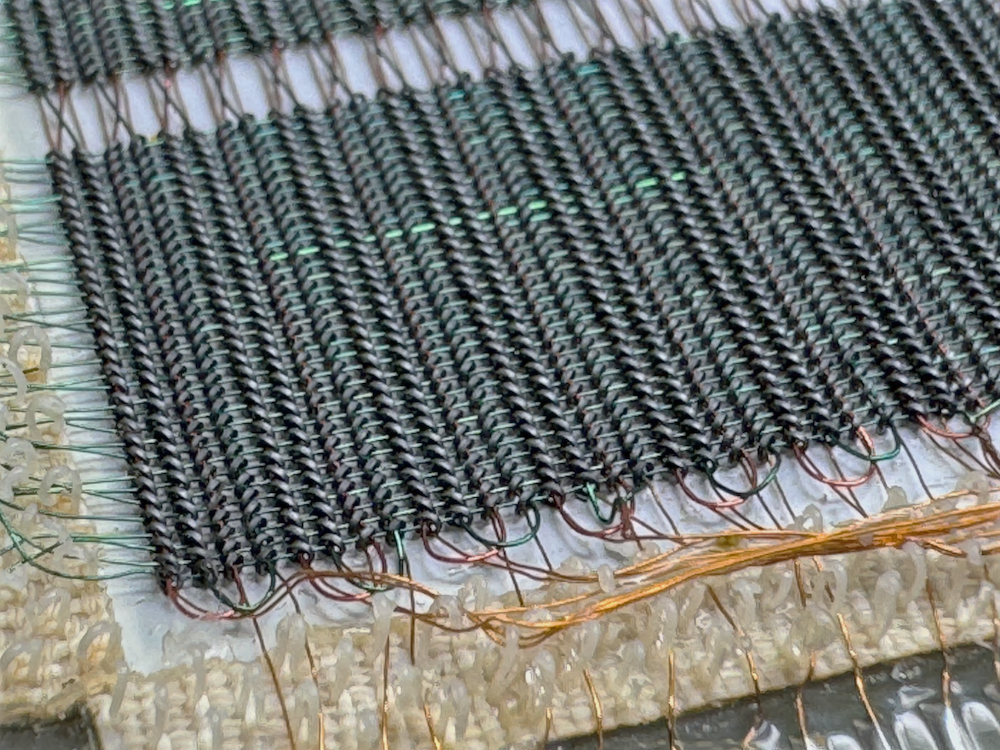 Detail of the core
memory in the “real” PDP-8. Each core is less than one millimeter
across.
Detail of the core
memory in the “real” PDP-8. Each core is less than one millimeter
across.
One of the most fascinating features of the PDP-8 is its use of ferrite-core memory, or core memory, something now found almost exclusively in museums—unless one is lucky enough to own a machine from that era.
Core memory did not use transistors, capacitors, or integrated circuits to store bits. It consisted of a matrix of tiny ferrite rings crossed by very thin wires. Each core could be magnetized in one direction or the other, thus representing either a zero or a one. To read or write a memory word, the machine circulated appropriate currents through the wires passing through the selected cores.
Reading was destructive: to determine the state of a core, it was forced into a known state and the machine observed whether a pulse appeared on the sense wire. If the data had to remain in memory, the computer therefore had to rewrite it immediately after reading it. This may seem a strange complication today, but at the time it was entirely normal.
On the other hand, core memory had one precious quality: it was non-volatile. When the computer was switched off, the contents of memory were not lost. It could therefore happen that a PDP-8 was switched back on and the program or data present at the moment of shutdown were still in memory. For those accustomed to modern RAM, which forgets everything as soon as power is removed, this is a small technological miracle.
My PDP-8/m
I have owned a PDP-8 since the late 1970s, thanks to a fortunate series of circumstances.
The machine at the center of this story is a PDP-8/m, not very different from the better-known PDP-8/e. Originally it was part of a larger system, confirming one of the typical uses of the PDP-8: not so much a computer intended for standalone use as an intelligent controller hidden inside a more complex machine.
In the early 1970s, my father directed a public health institute. To reduce the cost of blood tests, he decided to purchase an automatic analyzer produced by Vickers Medical, a large British company. Inside that sophisticated piece of equipment, a PDP-8 served as the system controller.
When the machine was installed, naturally I did not miss the chance to look inside it. I worked for free, but in exchange I could play with the PDP-8 whenever the analyzer was not in use. I still remember a very helpful English technician who taught me many things about that machine and helped kindle a passion that has stayed with me ever since.
The Vickers analyzer was a remarkable machine, but for non-technical reasons its purchase proved to be an unfortunate choice. For reasons probably more administrative, political, or economic than technical, the machine, although perfectly functional, was never really put into service. After a few years it was dismantled.
And the PDP?
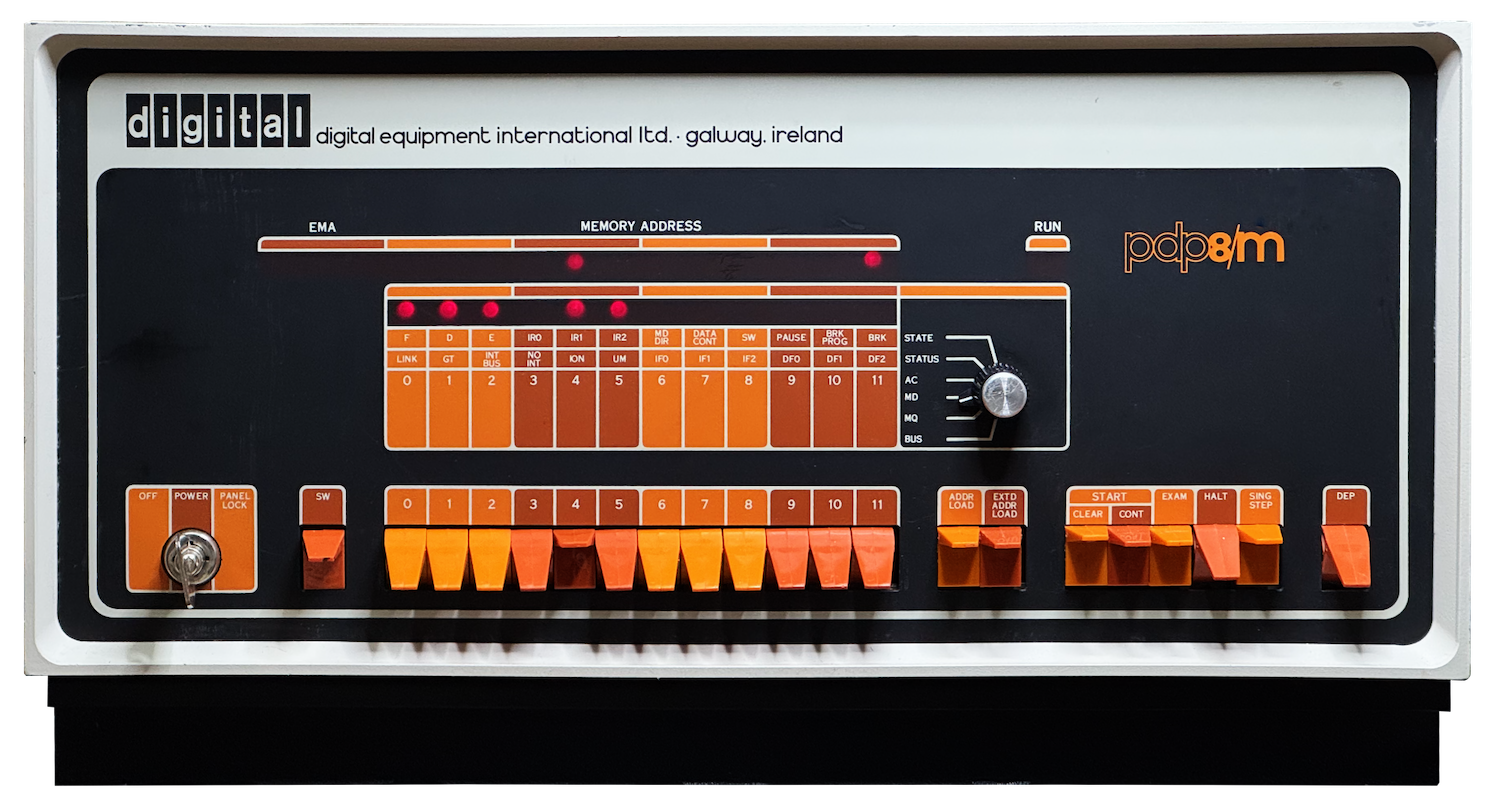 My PDP-8/m remained on
a shelf for more than forty years, in the various offices I had during
my professional life, patiently waiting for the moment when it could be
brought back to its former glory. Repairing it was anything but easy:
many TTL integrated circuits had to be replaced. Fortunately, the most
critical part, the core memory, had withstood the passage of
time.
My PDP-8/m remained on
a shelf for more than forty years, in the various offices I had during
my professional life, patiently waiting for the moment when it could be
brought back to its former glory. Repairing it was anything but easy:
many TTL integrated circuits had to be replaced. Fortunately, the most
critical part, the core memory, had withstood the passage of
time.
I asked whether I could keep the computer, probably a PDP-8/L, together with its teleprinter. At first the administration agreed, and I took those wonderful toys home, hardly believing my luck. A few hours later, however, they changed their minds. Someone came to retrieve them and, to my great disappointment, I was told that they had to be “officially” destroyed.
Then, perhaps seeing my despair, someone took pity on me and said something like: “Listen, kid, in that other box there is another computer. It was probably a spare unit. There are no documents and officially it does not exist. If you want, you can keep it.”
That was my PDP-8/m.
Since then it has followed me everywhere, remaining in all the offices I have had during my professional life.
At the beginning of this story, in April 2026, the PDP-8/m was not completely dead, but it was certainly far from alive. That was where its new adventure began—an adventure that also led to the creation of the book PDP-8: The Minicomputer That Anticipated Microprocessors, available from www.quacktech.it.
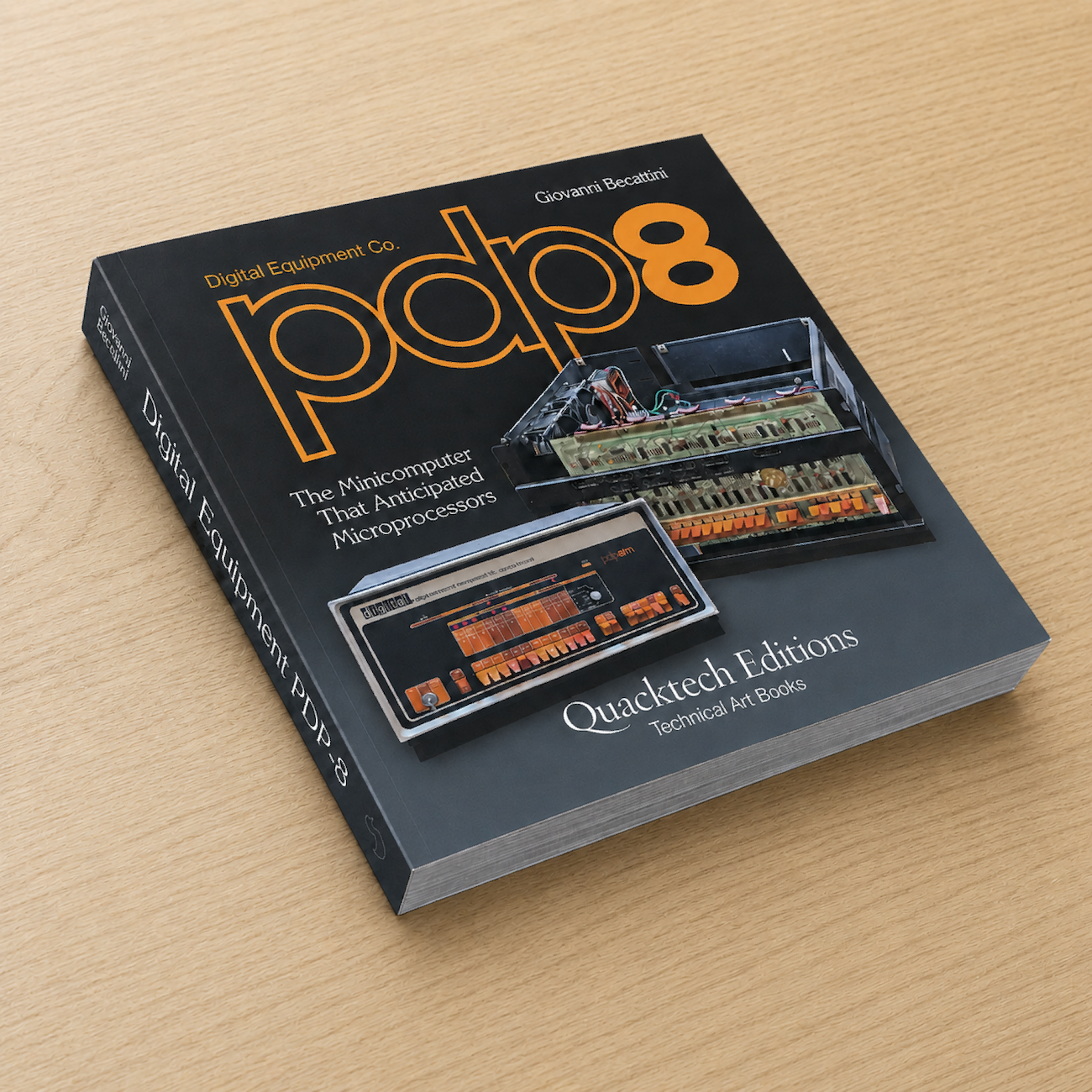 The book PDP-8: The
Minicomputer That Anticipated Microprocessors, available from
www.quacktech.it.
The book PDP-8: The
Minicomputer That Anticipated Microprocessors, available from
www.quacktech.it.
The birth of OTTO
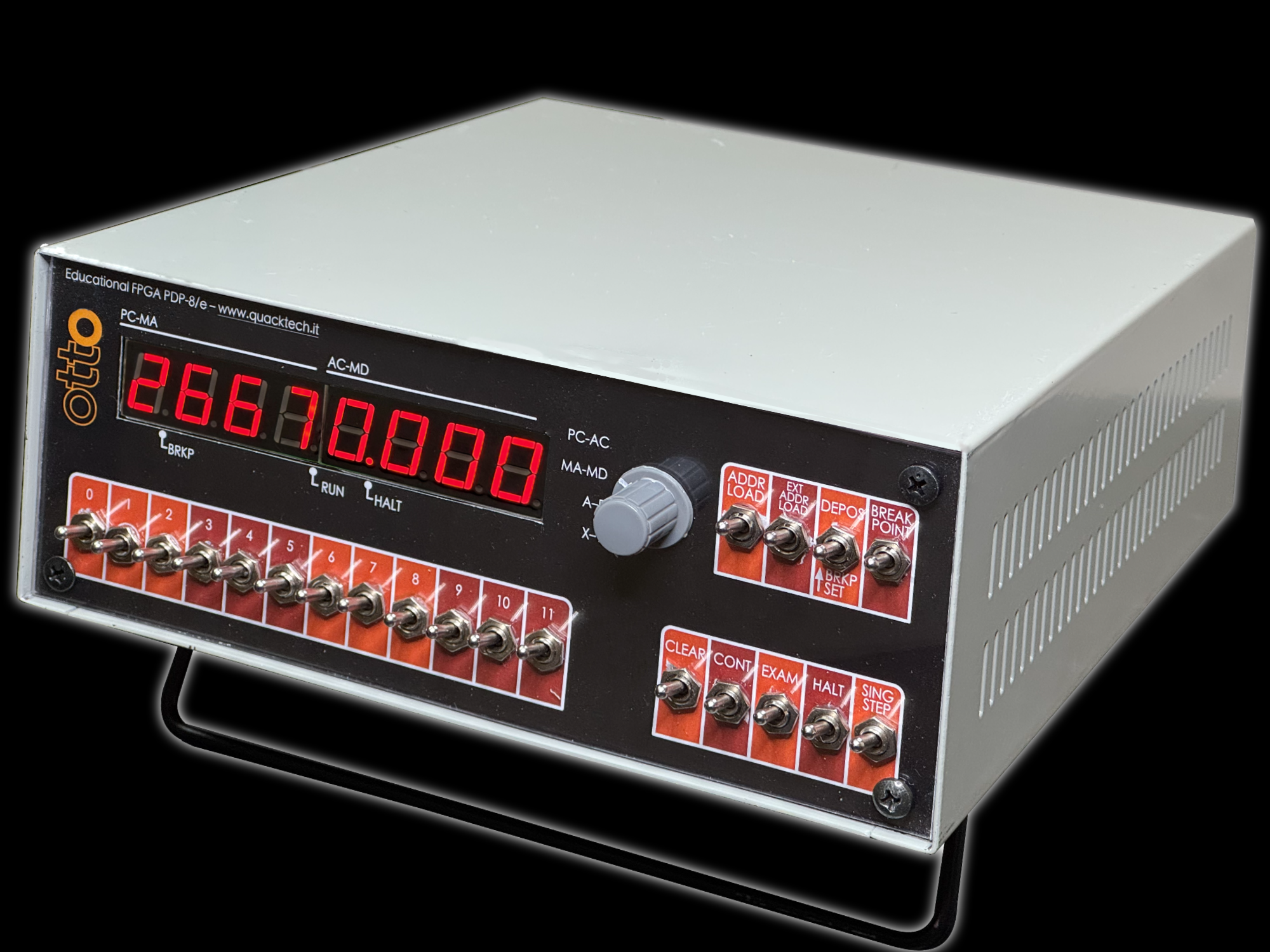 OTTO in its latest
version.
OTTO in its latest
version.
Several years ago, the familiar little devil on my shoulder put into my head the idea of learning a hardware description language.
The classic introductory FPGA examples, however, did not excite me very much. Making an LED blink is certainly useful, at least at the beginning, but it only takes you so far. I was looking for a project difficult enough to force me to learn something properly, yet still small enough to remain within my reach.
So I asked myself: why not try to build a PDP-8 clone?
That was the beginning of the OTTO project: my attempt to reproduce, inside an FPGA, a computer inspired by the PDP-8.
Why OTTO?
“Otto” is a German personal name, but in Italian it is also the number eight. For a project inspired by the PDP-8, therefore, the name was almost inevitable.
There was, however, another reason. Otto was the name of my partner when I founded my company in 1998. True, he was a dog, but that did not prevent him from being the boss.
In what was then my company, many software tools and several internal projects received names derived from Otto, and some still keep them today, almost thirty years later. So, when I needed to give a name to my personal PDP-8, OTTO was the most natural choice.
It meant eight, it was mine, and it was slightly crazy. Perfect.
What is inside OTTO
OTTO is not a software emulator of the PDP-8. It is not a program running on a normal modern computer while pretending to be an old machine. It is something different: a hardware description of the processor, memory, and some essential peripherals, implemented inside an FPGA.
An FPGA, or Field Programmable Gate Array, is a programmable integrated circuit that can be configured to implement almost any digital circuit within its available resources. Instead of writing a program to be executed by an existing processor, you describe the circuit you want to create: registers, counters, multiplexers, memories, control signals, logic gates, and connections between the various parts.
In the case of OTTO, inside the FPGA we therefore find a machine inspired by the PDP-8: a 12-bit accumulator, a program counter, memory, control logic, the main instructions, and a simple serial interface that plays the role of the old teleprinter.
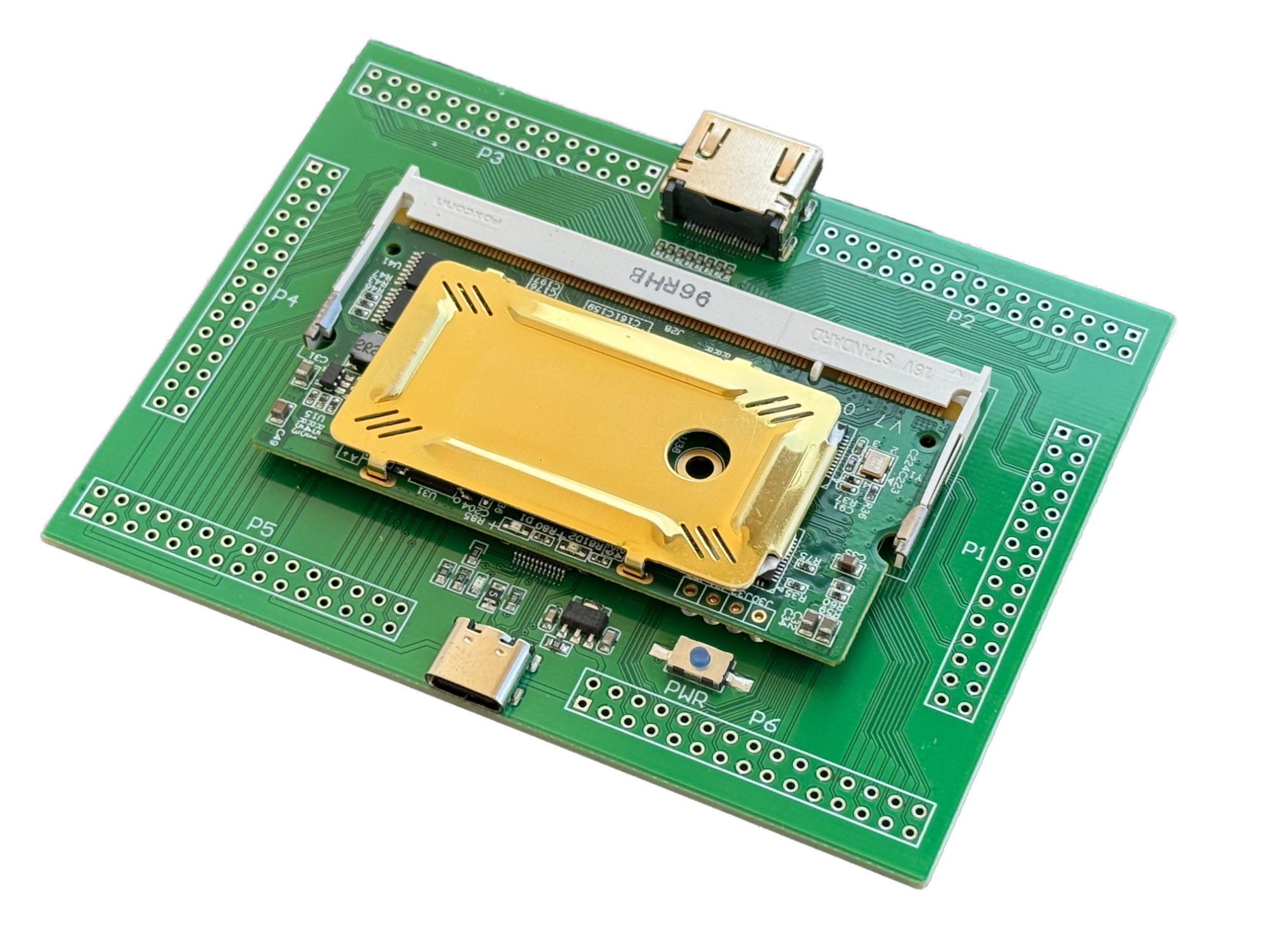 The OTTO project is based on
the Colorlight i5 v7.0 module. Originally designed to drive LED panels,
it has become popular as a low-cost FPGA development platform. At its
heart is a Lattice ECP5 LFE5U-25F, a device with about 24,000 logic
elements: far more than is needed to implement a computer similar to the
PDP-8. The module also includes SDRAM, SPI flash memory, clock
circuitry, and Ethernet PHYs. Used together with a small base board, it
becomes a convenient experimental platform, providing the necessary
connections for power, programming, and I/O.
The OTTO project is based on
the Colorlight i5 v7.0 module. Originally designed to drive LED panels,
it has become popular as a low-cost FPGA development platform. At its
heart is a Lattice ECP5 LFE5U-25F, a device with about 24,000 logic
elements: far more than is needed to implement a computer similar to the
PDP-8. The module also includes SDRAM, SPI flash memory, clock
circuitry, and Ethernet PHYs. Used together with a small base board, it
becomes a convenient experimental platform, providing the necessary
connections for power, programming, and I/O.
Of course, I did not try to reproduce every electrical detail of the original PDP-8. That would have been pointless and, in some cases, impossible. OTTO contains no ferrite cores, no DEC boards, no Omnibus, and no 74-series TTL circuits. The memory, for example, is implemented using the internal resources of the FPGA. From a physical point of view, therefore, it is a completely modern machine.
From the logical point of view, however, the game becomes interesting. The instructions are those of the PDP-8, the registers have the same size, programs can be entered from the front panel, and the general behavior remains close enough to that of the original machine to allow very realistic educational experiments. It also passes the original instruction-set tests.
This is, at least for me, the true charm of the project. OTTO does not seek to replace a real PDP-8, nor does it claim to be a perfect clone. Rather, it aims to make a small computer architecture visible and understandable: simple enough to be grasped, yet complete enough to remain surprising.
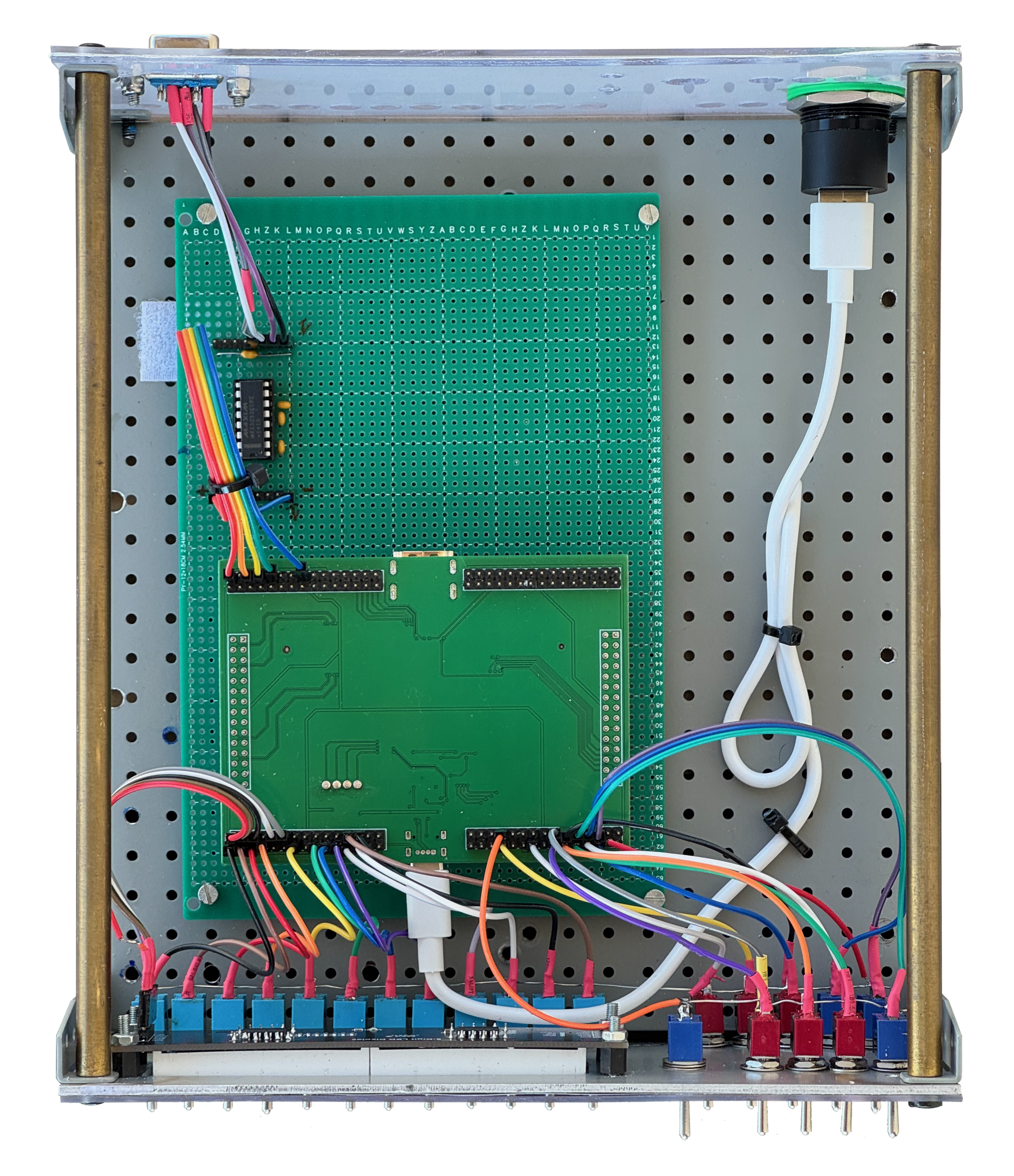 Internal view of
OTTO. The enclosure is practically empty; I used one this large only
because I already had it. Everyone can build it in whatever form they
prefer.
Internal view of
OTTO. The enclosure is practically empty; I used one this large only
because I already had it. Everyone can build it in whatever form they
prefer.
The front panel
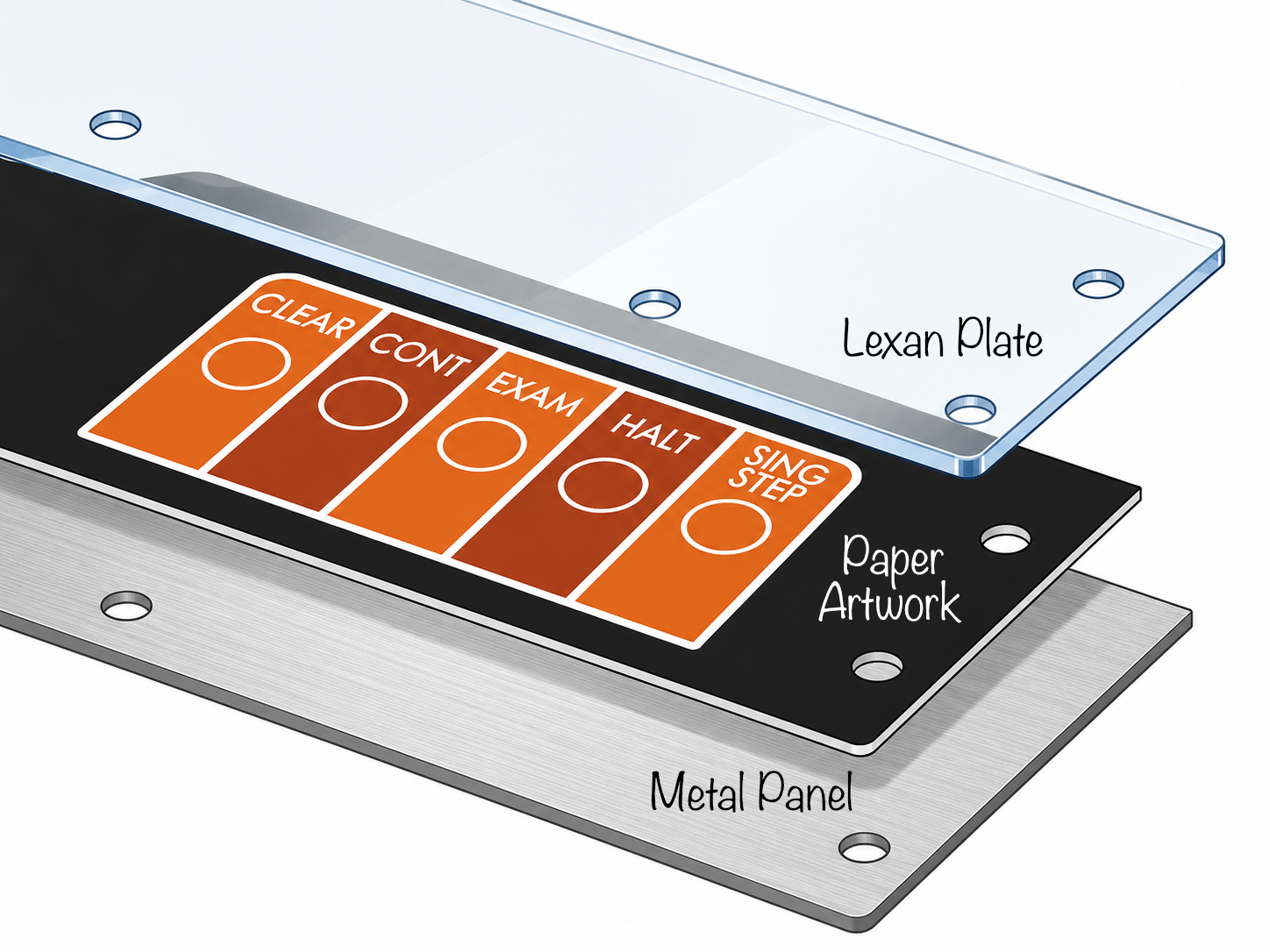 The technique
used to make the front panel is described in detail in the
ebook.
The technique
used to make the front panel is described in detail in the
ebook.
The most important part of OTTO, at least from the point of view of the user experience, is the front panel.
A modern computer, even when extremely powerful, tends to hide everything. It starts up, displays a graphical interface, loads an enormous operating system, and presents us with a ready-made world in which the real hardware has almost disappeared.
In the PDP-8, by contrast, the hardware is right there in front of us. The switches and lamps are not decorations: they are the most direct way to enter the machine.
That is why I wanted OTTO to have a front panel as well. It is not merely an aesthetic or nostalgic choice. It is an essential part of the educational project.
Through the switches you can set an address, deposit a value in memory, examine the contents of a location, start the program, stop it, and observe its evolution. With only a few commands, you can see concretely that memory is made of numerical words, that an instruction is nothing more than a number, that the program advances from one location to the next, and that even an apparently trivial result, such as printing a character, requires a precise sequence of operations.
In my prototype I also added a small seven-segment display, used to show information such as the contents of the program counter or the accumulator. It is not identical to the original DEC panel, of course, but it performs its task well: it lets you see the machine while it is working.
At this point, practical uselessness becomes a virtue. Nobody builds OTTO to replace a modern computer; it is even slower than the original. You build it to look inside a computer, to understand how an instruction comes to life, how data moves, and how a sequence of bits can turn into behavior. It is a small, inexpensive, and slightly crazy object, but precisely for this reason it restores something that has almost completely disappeared from modern computers: direct contact with the machine.
Practical example
We have talked a lot, but we have not yet seen anything concrete. So here is a small practical example: a program that sends a character through the serial port. We will then see how to load it into memory and run it from the front panel.
First, however, we must remember one fundamental thing: for the PDP-8, every instruction is simply a number.
The PDP-8 is a 12-bit machine. Each memory word therefore contains 12
bits, which can represent data, an address, or a machine instruction.
Today it is natural for us to write a program using mnemonics such as
CLA, TAD, JMP, or
HLT, but the processor does not see those names. It sees
only numbers.
For example, the instruction:
CLA CLLwhich clears the accumulator and the Link, corresponds to the octal
number 7300.
The PDP-8 traditionally uses octal notation, that is, base 8. The possible digits are therefore only 0, 1, 2, 3, 4, 5, 6, and 7.
The choice is not accidental. One octal digit represents exactly
three bits; a 12-bit word can therefore be conveniently written with
four octal digits. For example, 7300 represents a complete
12-bit word. Memory addresses are also normally written in octal: in a
basic 4K-word machine, locations range from 0000 to
7777.
Our small program will be loaded starting at location
0200, a very common address in PDP-8 examples.
We want to transmit the character A. In ASCII code, the
letter A has the decimal value 65, that is,
101 in octal. The program is shown below.
| Address | Code | Instruction | Meaning |
|---|---|---|---|
0200 |
7300 |
CLA CLL |
Clears the accumulator and the Link |
0201 |
1206 |
TAD CHAR |
Loads into AC the character to be transmitted |
0202 |
6046 |
TLS |
Sends the character to the teleprinter or serial interface |
0203 |
6041 |
TSF |
Checks whether transmission has been completed |
0204 |
5203 |
JMP 0203 |
Waits if transmission has not been completed |
0205 |
7402 |
HLT |
Stops the program |
0206 |
0101 |
CHAR |
ASCII code of the letter A |
The program begins by clearing the accumulator, the machine’s main
register. It then executes the instruction TAD CHAR, which
adds to the accumulator the contents of the location symbolically called
CHAR. Since the accumulator had just been cleared, the
result is simply the value of the character to be transmitted.
At location 0206 we have in fact written the number
0101, that is, the ASCII code of the letter
A.
The instruction TLS, short for Teleprinter Load
Sequence, transfers the contents of the accumulator to the transmit
register of the teleprinter, or more generally of the PDP-8-compatible
serial interface, and starts sending the character.
At this point the program must wait until transmission is complete.
It does this with a small waiting loop: TSF checks the
teleprinter flag. If transmission is complete, it skips the next
instruction. If, instead, transmission is still in progress, it skips
nothing, and therefore JMP 0203 is executed, bringing the
program back to check the flag again.
When the character has finally been transmitted, TSF
skips the JMP and the program reaches HLT,
stopping execution.
Loading it into memory
The interesting thing is that this program can be entered directly from the front panel, without an assembler, without an operating system, and without any other help. You simply load into memory, one after another, the octal numbers shown in the table.
The operating sequence is typically this:
- set
0200on the front-panel switches; - press
ADDR LOADto load the initial address; - set
7300on the switches; - press
DEPto deposit the first value in memory; - continue with
1206,6046,6041,5203,7402, and0101, pressingDEPeach time; - set
0200on the switches again; - press
ADDR LOADagain; - press
CONTto start the program.
If everything is connected correctly, the letter A will
appear on the serial output.
It is a very modest result, of course. But it is also a small miracle: we have written seven octal words directly into memory, and a machine more than half a century old, or its FPGA clone, has executed those words as real instructions.
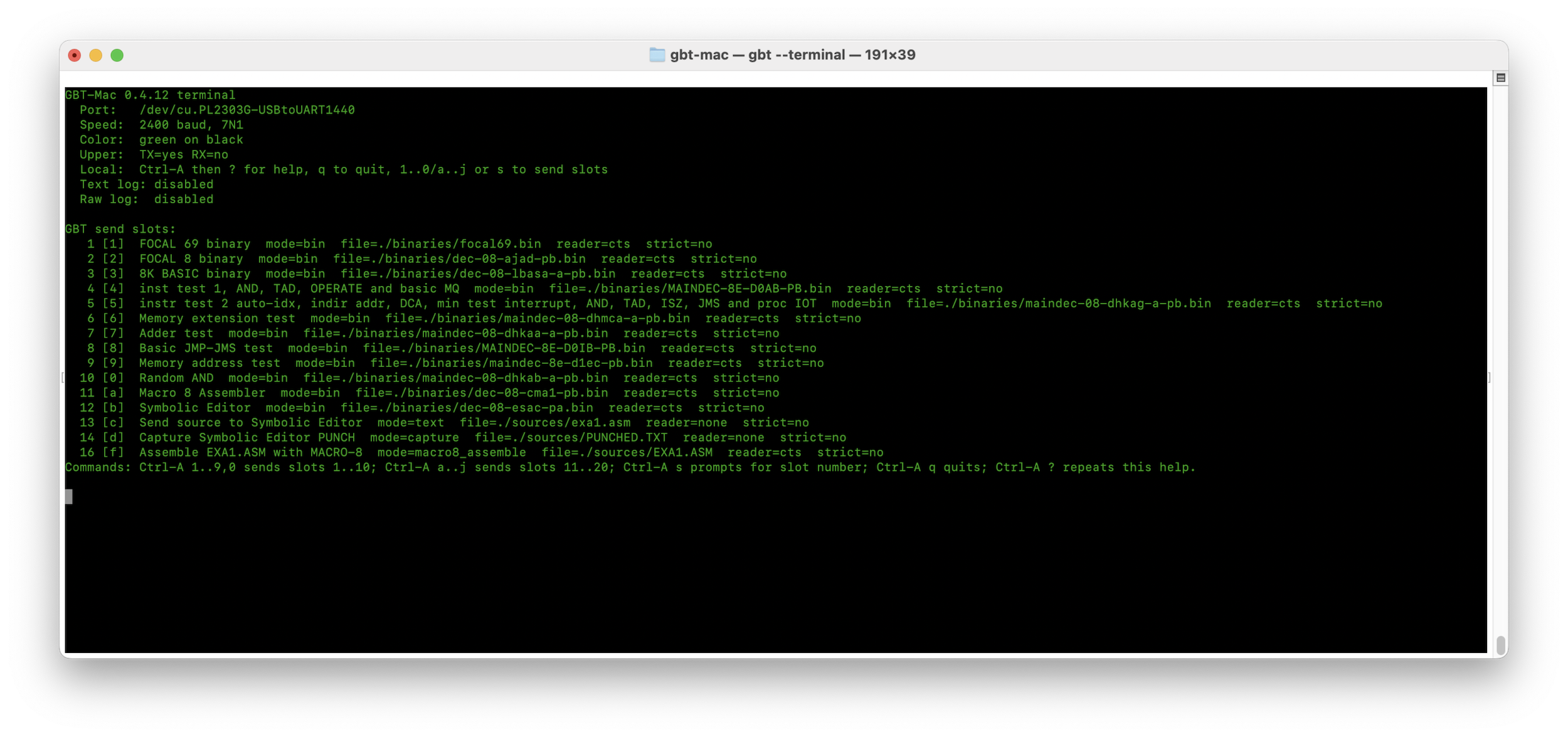 Together with OTTO, I also
created a companion Teletype emulator. It includes several classic DEC
software packages, such as FOCAL, BASIC, and assemblers, so that they
can be loaded into OTTO and tested. It runs at the astonishing speed of
2400 baud. Originally, my PDP-8 was limited to 110 baud, but a small
modification allowed it to scale these dizzying heights.
Together with OTTO, I also
created a companion Teletype emulator. It includes several classic DEC
software packages, such as FOCAL, BASIC, and assemblers, so that they
can be loaded into OTTO and tested. It runs at the astonishing speed of
2400 baud. Originally, my PDP-8 was limited to 110 baud, but a small
modification allowed it to scale these dizzying heights.
Building OTTO
The greatest difficulty in reproducing OTTO is not so much the electronics as the mechanical part: the front panel requires a fair number of toggle switches, pushbuttons, connections, and a little care to obtain a pleasant appearance.
A free ebook
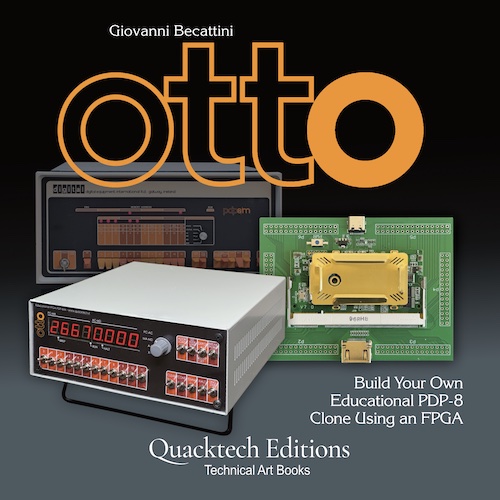
For those who would like to explore building OTTO in greater depth, I have prepared a dedicated free ebook of about 100 pages, containing schematics, drawings, explanations, and much more information.
It can be downloaded free of charge, together with all OTTO source files and the practical information needed to build it.
Quick start
To give an idea of the level of difficulty involved, without immediately delving into Verilog, synthesis tools, place-and-route, timing constraints, and the other small esoteric rituals of FPGA development, there is a much simpler route.
To replicate OTTO, it is not necessary to install the entire
development environment. You do not need Yosys, nextpnr, ecppack, or the
other tools required to rebuild the project from source. All you need is
a correctly wired Colorlight i5 board, the ready-made configuration file
included in the free downloadable kit, and the ecpdap
program used to transfer the bitstream to the FPGA.
In practice, you must build the hardware, connecting the front panel,
the display, and the serial interface according to the pin assignments
in the colorlight_i5.lpf file. Then copy the ready-made
file—for example, PDP_colorlight_top.bit—into a convenient
folder on your computer and connect the board to the PC via USB.
Before programming the board, it is advisable to check that
ecpdap recognizes the CMSIS-DAP interface and the FPGA:
ecpdap probes
ecpdap scan
For a first test, OTTO can be loaded temporarily into the FPGA SRAM:
ecpdap program PDP_colorlight_top.bit -f5MIn this way the configuration works immediately, but it is lost when power is removed from the board.
To make OTTO permanent, so that it starts automatically when powered on, the bitstream must instead be written to the SPI flash memory:
ecpdap flash write PDP_colorlight_top.bitOn some boards the flash may be protected. If writing fails, it can first be unlocked with:
ecpdap flash -f5M unprotectand then the write command can be repeated.
At this point, just switch the board off and on again. If the wiring is correct, OTTO starts by itself, without needing the FPGA development environment and without having to recompile anything.
FOCAL
A brief sermon is due on the amount of memory, which after many years is once again becoming a scarce and valuable resource because of the growing demand created by artificial intelligence systems.
In the late 1960s, however, integration technology did not yet allow practical memory chips of adequate capacity to be produced, and memory was extraordinarily scarce. When I tried to build my first computer in 1973, I did everything I could to obtain a core memory, without success.
Today, the 4K words of a basic PDP-8 may make you smile; a single icon on your screen consumes far more.
At the time, however, one had to make do with what was available. DEC offered carefully pared-down programs for the PDP-8, using tricks we can scarcely imagine today in order to exploit the platform as effectively as possible.
Among them was FOCAL, a programming language similar in some respects
to BASIC, which could run within the famous 4K-word limit. In the
downloadable kit you will find two different files: one with the binary
loader already in memory, ready to receive other programs through the
serial port, and one with FOCAL ready to run. You need only switch on
the machine, set 0200 on the switches, and press
ADDR LOAD and CONT. The magical *
will appear on your terminal emulator, indicating that OTTO is waiting
for your commands.
Conclusion
At this point one might ask: why do it?
Why build, today, an almost-clone of the PDP-8, when even the cheapest microcontroller has immensely superior performance?
The PDP-8 belongs to a generation of machines whose computer architecture was still small enough for one person to understand. It was not simple in an absolute sense, but it was still readable. One could follow an instruction, understand where data went, observe the contents of the registers, read the circuit diagram, and, with patience, reconstruct the behavior of the machine.
OTTO tries to preserve precisely this aspect. It is not a commercial product, it is not a useful computer in the modern sense of the word, and it does not claim to be a perfect replica.
It is simply a way to bring back to life, with modern tools and at very low cost, a small part of the spirit of the PDP-8.
In the end, the charm of these machines does not depend only on nostalgia. It depends on the fact that they remind us of a fundamental truth of computing: a computer is not magic. It is a logical machine, made of registers, memory, signals, instructions, and time. When it can be observed closely enough, even a simple program that prints a letter becomes a small lesson in architecture.
And if in the end all this is practically useless, so much the better. Some of the most beautiful things that can be built in a laboratory are not born because they are useful, but because they help us understand, remember and, above all, have fun. And it is hard to imagine anything with a better fun-per-euro ratio…